
In gold prospecting, staking a claim gives you the legal right to dig. It doesn’t put a single ounce of gold in your pocket. Your Google Business Profile works the same way. Claiming and verifying it was the easy part. The work that gets you into the top three on Google Maps, when someone in Mango Hill, Redcliffe or Caboolture searches for what you do, happens after that.
If you’ve already set up your profile, this is your next step in learning how to optimise your Google Business Profile step by step. (If you haven’t, start with our beginner’s guide to Google Business Profile and come back.) Below is the 2026 checklist we use to work a profile properly: ten checks, roughly in the order we’d tackle them, plus a weekly routine that takes about 20 minutes. It also covers one big change from the past year that many checklists still get wrong: the end of the Q&A section.
| THE SHORT ANSWER To optimise your Google Business Profile, get your primary category right, fill in every service, set accurate hours, define your service area, post fresh photos and updates weekly, earn a steady stream of recent reviews, keep your details identical everywhere online and make sure your website backs it all up. Google’s Q&A section has been retired, so your website now has to do the job of answering customers’ questions. |
Why Some Profiles Sit in the Top Three While Others Never Get Seen
Google says local results are ranked on three things: relevance (how well your profile matches what someone searched for), distance (how close you are to them) and prominence (how well known and trusted your business appears to be). You can’t change where your business is located, but you can do a lot about the other two, and that’s what this checklist is about.
Google doesn’t publish the exact recipe, so the best guide we have comes from industry research. Whitespark’s 2026 Local Search Ranking Factors report surveyed 47 leading local SEO specialists on 187 factors. It’s expert opinion rather than Google’s own formula, but the pattern is clear: your profile settings carry the most weight, reviews come next, and your website matters more than most people expect. For the first time, the report also looks at what gets a business recommended in AI search answers.
Think of the checklist as an assay. In mining, an assay is a test that tells you exactly how much valuable material is in a sample, so you know where to dig. Each check below tells you where your profile is strong and where the gold is still in the ground.
The 2026 Google Business Profile Checklist
Work through these in order. Each check takes between five and thirty minutes, so you can tick a few off over a cuppa.
1. Check Your Primary Category
Your primary category is the single most powerful setting on your profile, according to the local SEO experts in the Whitespark survey. It tells Google what your business mainly does, so it decides which searches you’re even considered for. Choose the most specific category that describes your main service. An electrician who mostly installs solar, for example, should compare “Electrician” with “Solar energy contractor” and pick the one that matches where most of the work comes from.
Add secondary categories only where they’re genuinely true. Google’s own guidelines say to choose the fewest categories needed to describe your core business, and a long list of loosely related ones can water down your relevance. Google also adds new categories from time to time, so review yours every six months.
2. Fill In Every Service
The services section is one of the most underused parts of a profile. Add each service you offer, choose from Google’s suggested services where they fit, and write a short plain-English description for the rest. If you can show a price or a “from” price, do. This is the information Google uses to match your profile to searches like “blocked drain Kallangur” or “occupational therapy Redcliffe”, so the more precise you are, the better.
Allied health and NDIS providers should list each support type they deliver by name. Participants, carers and plan managers often search by support type rather than by business name.
3. Set Your Hours Carefully
Being open at the time of a search is one of the more influential factors for map results, according to the specialists surveyed by Whitespark, and their research suggests rankings can begin to slip in the last hour before you close. That doesn’t mean you should list hours you can’t keep, because inaccurate hours lead to frustrated customers and bad reviews. It does mean your hours should reflect when someone genuinely picks up the phone.
Set special hours for public holidays too. With Christmas and New Year coming up, now is the time to do it. A profile showing “open” when you’re closed is a fast way to collect a one-star review.

4. Define Your Service Area and Write Your Description
If you travel to customers, you’re what Google calls a service-area business. You can hide your address if customers don’t visit you there, and you can list up to 20 service areas by suburb or postcode. Google recommends keeping the overall area within about two hours’ drive of your base. Pick the suburbs you actually want work in, such as North Lakes, Mango Hill, Narangba, Redcliffe or Caboolture, rather than trying to cover all of South East Queensland.
Your business description has a 750-character limit. Use it to say what you do, who you do it for and where, in plain English. Write for a person, not a search engine. Leave out links, phone numbers and special offers, and don’t stuff in keywords. Your business name should be exactly your real-world name too, with no extra keywords added.
5. Keep Your Photos Fresh and Real
Photos show people you’re real and active. Upload a few new ones every month rather than dumping fifty at once: your team, your vehicles, work in progress, finished jobs, and your premises if customers visit. Skip the stock photos, because people can spot them a mile off. Naming your files sensibly before you upload, such as “north-lakes-bathroom-renovation.jpg”, is good housekeeping, though there’s no proof it moves rankings, so don’t spend hours on it.
6. Post Every Week
Posts are the short updates that appear on your profile. Google hasn’t said they directly boost rankings, but the experts behind the Whitespark survey see engagement and freshness signals rising in importance, and posts give people a reason to call. Aim for one a week. A formula that works is one service, one suburb, one useful tip and one button. For example: “Hot water system over ten years old? A pre-summer service check could save you an emergency call-out in Narangba this Christmas.”
Skip phone numbers in the post text, because Google may reject the post. Use the button instead: “Call now”, “Book” or “Learn more”.
7. Build a Steady Flow of Recent Reviews
Reviews are one of the biggest levers after your profile settings. What matters most is recency and consistency. A steady trickle of new reviews each month sends a stronger signal than a burst of fifty from last year that then dries up. Ask every happy customer, ideally within a day of finishing the job, while they’re still pleased. Send them your direct review link by text, or add a QR code to your invoice.
Reply to every review, good or bad, in a friendly, professional tone. Replies won’t necessarily lift your rankings, but they do influence the people deciding whether to call you. And never offer discounts or gifts in exchange for reviews, or ask only the customers you expect to be positive. Both break Google’s policies and can get reviews removed.
8. Give Google the Answers: Ask Maps and the End of Q&A
This is the check most 2026 guides still miss. Google retired the Questions and Answers section on Business Profiles. It switched off the Q&A API in November 2025 and phased out the public section from December, replacing it with an AI-powered experience, often called Ask Maps, that answers people’s questions about your business directly, drawing on your profile, your website and your reviews.
That changes the job. You used to write your own answers. Now Google writes them for you, using whatever it can find, and if the information is missing or inconsistent it may skip the answer or get it wrong. The fix is to make the facts easy to find. Complete every part of your profile, put clear answers to common questions on your website (service areas, pricing, how booking works, if you’re NDIS registered), and encourage reviews that mention the specific work you did. In assay terms, you’re giving Google better samples to test.
9. Match Your Profile to Your Website
Your business name, address and phone number, known as NAP, need to be identical everywhere: your profile, your website and every directory listing. “St” versus “Street” or an old mobile number on a directory might sound small, but mixed signals make it harder for Google to trust you. Google your business name, list every place it appears and fix the odd ones out.
Your website should back the profile up. That means a clear page for each main service, your service areas mentioned naturally, and your contact details in the same format as your profile. It’s why local SEO starts with a solid website, and why it matters as much as the profile itself. In the Whitespark research, strong on-page content ranked as important for map results, standard local results and AI answers alike.
10. Track What’s Working
Once a month, open the Performance section of your profile and look at how many people called, requested directions or clicked through to your website, and which searches found you. Ignore the big headline numbers and watch those actions. It’s your phone ringing that counts.
Also check your position by hand. Search for your main service and suburb in a private browsing window, ideally on a phone in that suburb, and note where you appear. Do it for three to five searches once a month and keep a simple record. The first meaningful milestone is showing up in the top three for suburb-specific searches.
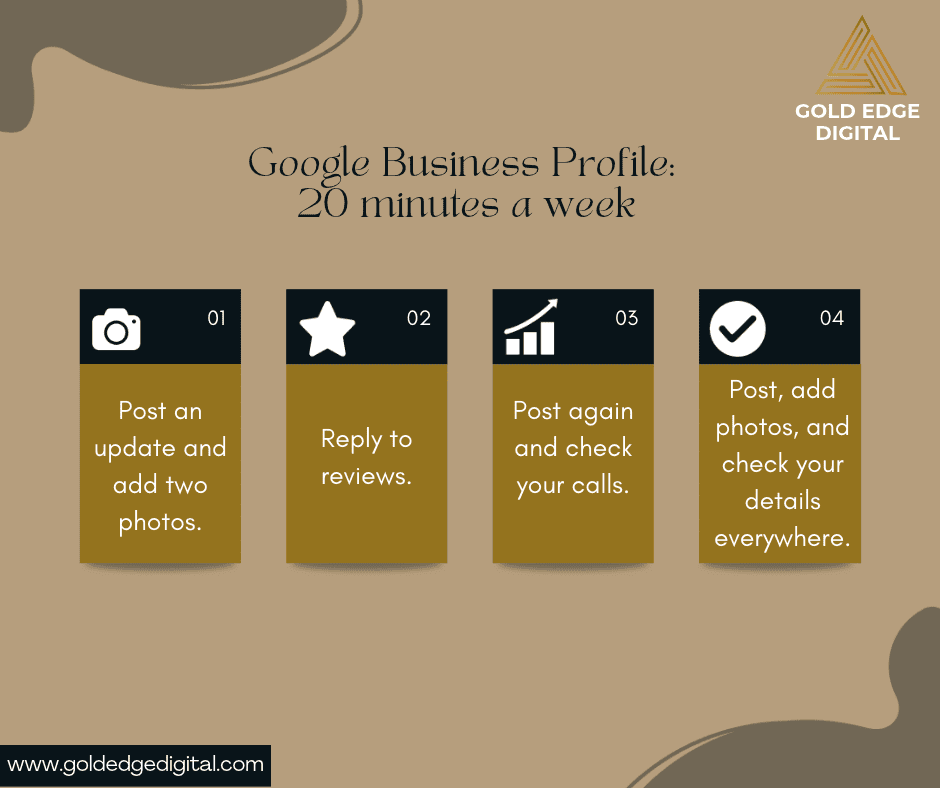
Your 20-Minute Weekly Routine
Consistency beats intensity. Here’s a simple rhythm that keeps your profile active without taking over your week.
| Week | What to do | Time |
| Week 1 | Publish a post and upload two new photos | About 10 min |
| Week 2 | Reply to any new reviews, ask two happy customers for one, and check your profile for edits you didn’t make | About 15 min |
| Week 3 | Publish a post and check your Performance figures (calls, directions, website clicks) | About 15 min |
| Week 4 | Publish a post, upload photos and check your name, address and phone number on one directory | About 20 min |
Keep an eye out for edits you didn’t make. Google can accept suggested changes from the public, so a quick monthly look at your hours, phone number and website link is well worth the time.
Mistakes That Can Get Your Profile Suspended
A few shortcuts look like gold and turn out to be fool’s gold. Adding keywords to your business name (for example “Smith Plumbing Brisbane 24/7 Cheap”) breaks Google’s guidelines. So does listing a virtual office or mailbox as your address, creating more than one profile for the same business, or buying reviews. A suspension can take your profile offline for weeks, and getting it back is slow and frustrating.
If you’re not sure whether something is allowed, check Google’s guidelines for representing your business, or ask us before you press save.
How Long Before You See a Difference?
Small wins can show up within a few weeks, such as more direction requests or calls once your services and hours are right. Movement into the top three usually takes longer. For most local businesses, 60 to 90 days of consistent work is a realistic first checkpoint, and competitive categories in busy suburbs can take longer. We’d rather be upfront about that than promise page one by Friday.
Frequently Asked Questions
How do I rank higher on Google Maps in Brisbane?
Start with the settings that matter most: the right primary category, every service filled in, accurate hours and a well-defined service area. Then build steady momentum with weekly posts, fresh photos and a regular flow of recent reviews, and make sure your name, address and phone number match everywhere online. Most businesses see first movement within 60 to 90 days.
Does posting on Google Business Profile help you rank?
Google hasn’t confirmed that posts directly improve rankings, but many local SEO specialists see regular activity as a positive signal, and posts give customers a reason to call. Posting weekly is a low-effort habit that’s worth keeping either way.
How many Google reviews do I need?
There’s no magic number. What matters is that you have more recent, genuine reviews than the businesses you’re competing with, and that new ones keep arriving. A steady two to four a month is a good target for many local service businesses.
Can I hide my home address on my Google Business Profile?
Yes, if you’re a service-area business and customers don’t visit you at your address. You can hide the address and list up to 20 suburbs or postcodes you serve instead. If customers do visit your premises, your address needs to stay visible.
What happened to the Q&A section on Google Business Profile?
Google retired it. The Q&A API was switched off in November 2025 and the public section was phased out from December, replaced by AI-powered answers in Google Maps that draw on your profile, website and reviews. The best response is to keep your profile complete and put clear answers to common questions on your website.
Do I still need a website if I have a Google Business Profile?
Yes. Your website is one of the main sources Google uses to understand what you do and where, and it’s what turns a browsing customer into an enquiry. Local SEO specialists rate strong website content as important for map results, standard results and AI answers alike.
Want Us to Do the Digging?
Working a profile properly takes consistent effort that most business owners simply don’t have time for, especially when you’re on the tools or with clients all day. Our SEO packages include regular Google Business Profile updates, from twice a month on Essentials to weekly on Growth, alongside the website and content work that backs them up.
Book a free chat with Liz and we’ll look at where your profile sits right now and what it could look like. No pitch, no pressure, no obligation. Prefer to start on your own? Grab our free Local Business Visibility Scorecard and see how your website and Google presence measure up.